Vibration Analysis for Rotating Equipment: Thresholds, Alarms, and Setup
A step-by-step guide to implementing vibration monitoring on pumps, motors, and compressors, with real ISO threshold values and alarm configurations.
A 200HP centrifugal pump on a cooling water loop threw an inner-race bearing at 2:47am on a Tuesday. The plant's vibration analyst had walked that route 11 days earlier, collected data with a handheld accelerometer, and marked everything "acceptable." The spectrum looked clean at the time. But inner-race defects on 3,560 RPM equipment can jump from barely detectable to metal-on-metal contact in as few as 14 days. By the time the next monthly route came around, the bearing had already seized, the shaft scored, and the pump was down for 9 days. Total cost: $142,000 in emergency repairs, lost production, and expedited parts.
That pump had a vibration program. It had a trained analyst. It had a route schedule. What it didn't have was the right alarm thresholds, the right monitoring frequency for its criticality, or any connection between its vibration data and the CMMS. The data existed. Nobody acted on it in time.
This article is a practitioner walkthrough for setting up vibration monitoring that actually prevents failures. Not theory. Not vendor pitches. Specific thresholds, specific sensor placements, specific alarm configurations, and a 90-day implementation plan you can start this week.
The $142K Vibration Signature Nobody Was Reading
The pump failure I described above is frustratingly common. I've seen variations of it at chemical plants, water utilities, and food processing facilities. The pattern is always the same: a plant invests in vibration hardware, trains an analyst or two, establishes monthly collection routes, and then wonders why unplanned failures keep happening.
The root cause isn't bad equipment or incompetent people. It's configuration. Most plants set vibration alarm thresholds either too loosely (so everything looks green until catastrophic failure) or not at all (so the analyst is eyeballing spectra with no statistical reference). A 2022 reliability engineering survey found that 47% of plants using vibration monitoring had never adjusted their default alarm thresholds from the factory settings on their software.
That's like installing a smoke detector and never putting batteries in it. The infrastructure is there. The protection isn't. Let's fix that, starting with the fundamentals of what to measure and why.
Picking the Right Measurement: Displacement, Velocity, or Acceleration
Vibration analysis gives you three fundamental measurements, and choosing the wrong one for your equipment is the fastest way to miss real faults.
Displacement (measured in mils peak-to-peak or microns) is your go-to for low-speed equipment running below 600 RPM. Think cooling tower fans, large agitators, or slow-roll turbines. At low speeds, the forces involved don't generate much velocity or acceleration, but shaft displacement can be significant. Proximity probes (eddy current sensors) are the standard here, installed directly in the bearing housing.
Velocity (measured in in/s RMS or mm/s RMS) is the workhorse metric for the vast majority of rotating equipment between 600 and 60,000 RPM. This is where ISO 10816 lives. Velocity correlates directly with vibration severity because it captures the energy of the vibration, not just the movement. If you monitor pumps, motors, fans, or compressors in this speed range, velocity is your primary screening metric.
Acceleration (measured in g's) and its cousin, acceleration enveloping (also called high-frequency demodulation or spike energy), are essential for catching bearing defects early. Bearing fault frequencies like BPFO (ball pass frequency outer race), BPFI (inner race), and BSF (ball spin frequency) generate high-frequency impulses that show up clearly in acceleration data but are invisible in velocity spectra until the defect is already severe.
Here's the critical point most programs miss: acceleration enveloping catches bearing faults 8 to 12 weeks before velocity alarms trigger. If you're only monitoring velocity, you're seeing bearing problems after they've already started causing secondary damage.
The Decision Matrix
- Below 600 RPM: Use displacement (proximity probes or low-frequency accelerometers)
- 600 to 60,000 RPM, general screening: Use velocity (RMS, broadband 10-1,000 Hz)
- Bearing fault detection at any speed: Use acceleration enveloping (1-10 kHz range)
- Gearbox analysis: Use acceleration (time waveform and spectrum, 0-20 kHz)
The most common mistake I see? Plants monitoring a 120 RPM kiln support roller with a standard velocity setup and wondering why they never catch bearing faults. At 120 RPM, the bearing defect frequencies fall below 10 Hz. Velocity measurements with a standard 10 Hz high-pass filter literally cannot see them.
ISO 10816 Thresholds: What the Standard Actually Says (and Where It Falls Short)
ISO 10816 (now largely superseded by ISO 20816, though the principles and values are similar) classifies machines into four groups and assigns vibration severity zones labeled A through D.
Machine Group 1: Large machines over 300 kW on rigid foundations. Think large turbines, generators, and compressors bolted to concrete pads.
Machine Group 2: Medium machines, 15 to 300 kW, on rigid foundations. Most process pumps and mid-size motors land here.
Machine Group 3: Large machines on soft or flexible foundations (structural steel, elevated platforms).
Machine Group 4: Small machines below 15 kW, including fractional horsepower motors and small pumps.
Each group has four zones defined by velocity in mm/s RMS:
- Zone A: Newly commissioned machines, typically below 0.71 to 1.12 mm/s depending on group
- Zone B: Acceptable for long-term operation, up to 1.8 to 2.8 mm/s
- Zone C: Conditional, acceptable only for limited periods, up to 4.5 to 7.1 mm/s
- Zone D: Dangerous, damage likely, above Zone C values
For a Group 2 machine (the most common category in a typical plant), the boundaries are: Zone A/B at 1.12 mm/s, Zone B/C at 2.8 mm/s, and Zone C/D at 7.1 mm/s.
Here's where the standard falls short: these are generic boundaries based on machine classification, not on your specific machine's baseline condition. A 50HP motor running consistently at 4.2 mm/s falls in the upper end of Zone B. According to the standard alone, that's acceptable. But if you've been trending this motor and it was running at 2.1 mm/s six months ago and has been climbing 0.3 mm/s per month, you have a machine heading for trouble. The absolute value says "fine." The trend says "plan a maintenance intervention now."
ISO 10816 is a starting point. Baseline data from your specific machines should override generic thresholds every time. Collect at least four weeks of data on a healthy machine before setting your alarm levels.
Vibration Monitoring Implementation Pipeline

Sensor Selection and Placement: Where Millimeters Matter
The sensor you choose and where you mount it determines the quality of every measurement you'll ever take. This isn't the place to cut corners.
Sensor Types
ICP/IEPE piezoelectric accelerometers are the gold standard for permanent installations. They offer wide frequency response (0.5 Hz to 10+ kHz), excellent signal-to-noise ratio, and decades of proven reliability. The PCB 603C01 (around $350) is a workhorse for industrial applications. For higher-budget programs, the SKF CMSS 2200 integrates nicely with SKF Multilog systems.
MEMS accelerometers power most wireless IoT vibration sensors. They're cheaper per point ($150 to $500 installed) and easier to deploy, but most top out at 3 to 5 kHz frequency response. That's fine for velocity-based screening but limits high-frequency bearing analysis. The Fluke 3563 wireless sensor is a solid mid-tier option that bridges portable and online monitoring.
Mounting Methods (Ranked by Frequency Response)
1. Stud mount: Best. Flat machined pad, threaded stud. Reliable response to 10 kHz or higher. Use this for permanent critical-asset installations. 2. Adhesive mount: Good. Epoxy or cyanoacrylate on a machined pad. Response to 5-7 kHz. Fine for most permanent installs where drilling isn't possible. 3. Magnetic mount: Adequate for route-based collection. Response drops above 2 kHz. Placement repeatability is a constant challenge. 4. Handheld probe: Worst. Response drops above 1 kHz, and you'll never get repeatable data. Use only for quick spot-checks, never for trending.
Placement Rules
For each bearing housing on a standard horizontal machine:
- Drive-end bearing: Three axes. Horizontal (perpendicular to shaft, 3 o'clock position), vertical (12 o'clock), and axial (parallel to shaft).
- Non-drive-end bearing: Two axes minimum. Horizontal and vertical. Add axial if you suspect angular misalignment.
Always mount on solid bearing housing metal, never on sheet metal guards, flexible mounting feet, or painted surfaces without surface prep. A sensor mounted on a thin fan guard will give you the vibration of the guard, not the bearing.
Cable routing matters more than most people think. Run vibration sensor cables away from VFD power cables by at least 12 inches. Cross power cables at 90 degrees if you must cross them at all. Use shielded cable with the shield grounded at the monitor end only to avoid ground loops that inject 60 Hz electrical noise into your vibration signal.
Building a Three-Tier Alarm Strategy That Actually Works
Single-threshold alarms are the main reason vibration programs die within their first year. When everything is either "OK" or "ALARM," you get two failure modes: too many false alarms (and people start ignoring them) or too few alarms (and you miss developing faults).
A three-tier system solves this by giving your maintenance team graduated response levels.
The Rule of Three Alarm Tiers
Set Alert at baseline + 2 standard deviations. Set Warning at the ISO Zone B/C boundary for your machine class. Set Danger at the Zone C/D boundary or 2x your baseline, whichever is lower. This catches both statistical anomalies and absolute severity thresholds. Review and adjust every 90 days using alarm history data.
| Equipment Type | Alert (mm/s RMS) | Warning (mm/s RMS) | Danger (mm/s RMS) | Envelope Alert (gE) |
|---|---|---|---|---|
| Centrifugal Pump (15-150 kW) | 1.8 | 2.8 | 7.1 | 0.5 |
| Electric Motor (15-300 kW) | 1.5 | 2.8 | 7.1 | 0.4 |
| Screw Compressor (>75 kW) | 2.2 | 4.5 | 11.0 | 0.8 |
| Cooling Tower Fan (<600 RPM) | 3.5 (displacement: 6 mils) | 5.0 (8 mils) | 8.0 (12 mils) | 1.0 |
| General-Purpose Fan (>600 RPM) | 2.0 | 3.5 | 7.1 | 0.5 |
These values are starting points based on ISO 10816 Group 2/3 machines. Adjust them downward for precision equipment and upward for inherently rough machines (like some positive displacement pumps).
Rate-of-Change Alarms
Absolute thresholds catch problems that have already become significant. Rate-of-change alarms catch problems that are getting worse, regardless of where the absolute value sits.
Configure a rate-of-change trigger when any measurement increases by 25% or more within a 30-day window. A motor running at a comfortable 1.4 mm/s that jumps to 1.75 mm/s is still well within Zone B, but that 25% jump in a month warrants investigation. In platforms like SKF @ptitude Analyst, Emerson AMS Machine Works, or Monitory's threshold engine, you can configure these as secondary alarm conditions that run in parallel with your absolute thresholds.
Key Statistics
47%
Of plants using vibration monitoring have never adjusted default alarm thresholds from factory settings
8-12 weeks
Lead time that acceleration enveloping provides over velocity alarms for bearing defect detection
$142K
Average total cost of a single unplanned pump failure including repairs, lost production, and expedited parts
23%
Fault detection gap between monthly route-based collection and continuous online monitoring
14-21 days
Window in which a detectable bearing defect can progress to catastrophic failure on 3,600 RPM equipment
Route-Based vs. Online Monitoring: The Coverage Gap Nobody Quantifies
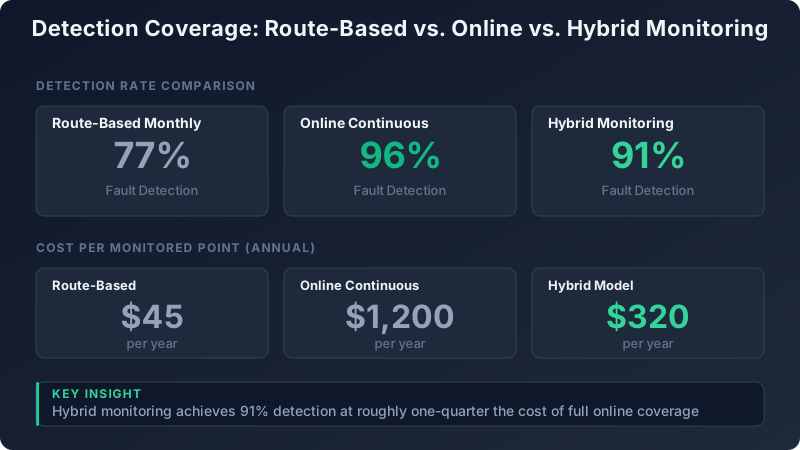
Monthly route-based data collection with a portable analyzer catches about 77% of developing faults. That sounds reasonable until you consider what the other 23% looks like: it's the fast-developing faults that go from detectable to destructive between your 30-day collection intervals.
Online continuous monitoring pushes detection rates to approximately 96%. Sensors sampling every second (or every few seconds for wireless nodes) catch rapid deterioration that a monthly route simply cannot see. But continuous monitoring costs $800 to $2,500 per measurement point installed, including the sensor, cabling or wireless infrastructure, and a channel on your monitoring system.
The Hybrid Strategy
The math points clearly toward a hybrid approach. Put continuous online monitoring on your critical assets: API 610 pumps, motors above 100 HP, compressors on critical process lines, and anything where an unplanned failure costs more than $25,000 in downtime. Use route-based portable collection on everything else.
A typical mid-size plant with 300 rotating assets might put 40 to 60 of them on continuous monitoring (covering the top 15-20% by consequence of failure) and route the remaining 240. The hybrid detection rate lands around 91%, and the cost per monitored point averages roughly $320 per year compared to $1,200 per year for full online coverage.
The key is getting the asset criticality ranking right. Don't just rank by horsepower or replacement cost. Rank by consequence of failure: what happens to production, safety, and environmental compliance when this machine stops unexpectedly? A 5HP chemical injection pump that shuts down an entire reactor train is more critical than a 200HP cooling water pump with an installed spare.
Detection Coverage: Route-Based vs. Online vs. Hybrid Monitoring
From Spectrum to Work Order: Closing the Loop
Here's a statistic that should bother every reliability engineer: 60% of industrial plants collect vibration data regularly, but only 35% generate work orders from it. That means a quarter of all vibration monitoring programs are expensive data collection exercises with no connection to maintenance action.
The gap between "we detected a fault" and "we fixed the fault" is where most vibration programs fail. Closing that gap requires integration between your vibration monitoring system and your CMMS.
Severity-to-Response Mapping
Each alarm tier should trigger a specific, documented maintenance response:
- Alert: Analyst reviews data within 48 hours. If confirmed, increase monitoring frequency to weekly. Log an observation in the CMMS (SAP PM notification, Maximo SR, or eMaint work request) for planning purposes.
- Warning: Auto-generate a planned work order with a 14-day completion window. Assign to the next available planner. Include vibration trend data and suspected fault mode in the work order description.
- Danger: Auto-generate a priority 1 work order. Notify the maintenance supervisor and operations shift lead immediately. Begin planning for controlled shutdown within 72 hours or sooner based on analyst assessment.
Monitory connects vibration trend data directly to work order priority scoring, so a machine trending toward a Warning threshold gets flagged in the maintenance queue before it actually trips the alarm. That's the difference between scheduled corrective maintenance and emergency breakdown repair.
The Integration Details
Most modern CMMS platforms support inbound API calls or file-based integrations. SAP PM accepts BAPI calls to create notifications. Maximo has REST APIs for work order generation. eMaint and Fiix accept webhook triggers. The technical integration is rarely the hard part. The hard part is getting maintenance planners to trust automatically generated work orders and act on them. Start by running the auto-generation in "shadow mode" for 30 days (create draft work orders for analyst review before release) to build confidence.
Your First 90 Days: An Implementation Checklist
If you're starting from scratch or rebuilding a struggling vibration program, here is a concrete 90-day plan.
Days 1-30: Foundation
1. Rank your rotating assets by consequence of failure. Identify your top 20 critical machines. Interview operators and maintenance techs, not just the asset register. 2. Select and install sensors on those 20 assets. Stud mount or adhesive mount for permanent installs. Budget $400 to $1,200 per measurement point depending on wired vs. wireless. 3. Collect baseline data for the full 30 days. Take at least 4 measurements per point spread across different operating conditions (loaded, unloaded, startup, steady-state). 4. Document machine nameplate data: RPM, bearing numbers, number of gear teeth, coupling type. You need this to calculate fault frequencies.
Days 31-60: Configuration
1. Calculate statistical baselines from your 30 days of data. Determine mean and standard deviation for each measurement point. 2. Set three-tier alarm thresholds using the approach described above: Alert at baseline + 2σ, Warning at ISO Zone B/C, Danger at Zone C/D or 2x baseline. 3. Configure acceleration enveloping alarms on all bearing measurement points with thresholds from your baseline data. 4. Set rate-of-change alarms at 25% increase per 30-day window. 5. Test your CMMS integration by manually triggering a test alarm and verifying the work order appears correctly.
Days 61-90: Tuning
1. Review every alarm that fired in the first 60 days. Categorize each as true positive, false positive, or inconclusive. 2. Adjust thresholds on any point with a false positive rate above 10%. Usually this means tightening (not loosening) the baseline window by collecting more data during steady-state conditions only. 3. Activate the auto-generate work order pipeline in your CMMS. Start with Warning and Danger tiers only. Add Alert-tier observations after the team builds trust. 4. Establish your tracking metric: Mean Time Between Alarm and Corrective Action (MTBACA). This measures how quickly your organization responds to a confirmed vibration alarm. Target: under 7 days for Warning tier, under 48 hours for Danger tier.
Remember that 200HP pump from the opening? With online monitoring and three-tier alarms, the inner-race defect would have appeared as an acceleration envelope Alert at least 8 weeks before failure. A Warning-tier work order would have been auto-generated 4 to 6 weeks out, giving the planner time to order a bearing, schedule a crew, and coordinate with operations for a controlled 4-hour shutdown. Instead of $142,000, the repair cost would have been under $3,000.
A $400 sensor on a $60,000 pump pays for itself the first time it catches a fault you would have otherwise missed. Start with your top 20 assets. Set your three alarm tiers. Connect your alerts to your CMMS. And track MTBACA starting this week.
Ready to put this into practice?
See how Monitory helps manufacturing teams implement these strategies.